Pages

Showing posts with label HTML. Show all posts

Wednesday, August 22, 2012

Is Nofollow Standard?

For some reason, I recently wondered if I should be annoyed that Web site owners are generally expected to include the non-standard rel="nofollow" attribute in links in their HTML. The problem with this thought is that calling the attribute “non-standard” is not particularly accurate. It depends on exactly what you mean by “non-standard.”

First, to be absolutely clear, adding rel="nofollow" to links is perfectly acceptable according to the HTML 4.01 standard. It passes the W3C’s validator. Frankly, though, I doubt that many people would lose sleep if it didn’t validate.

With that said, let me explain what I mean by “It depends.” When I first turned to the spec to fact-check myself, I came across the list of link types (which are the acceptable values for the rel attribute in a link), and “nofollow” isn't on it. The "nofollow" value does appear in the spec (Scroll to “Robots and the Meta Element”), but in the context of <meta name="robots" content="nofollow">, not the rel attribute. Besides, that section is “informative, not normative.”

On the other hand, there is nothing in the spec that prohibits Web developers from creating their own link types. (Whether it’s actually a good idea is another matter, which isn’t relevant here due to the widespread adoption of nofollow.) So anyone can use rel="nofollow". But there’s a catch. Here's what the section on link types has to say:
Authors may wish to define additional link types not described in this specification. If they do so, they should use a profile to cite the conventions used to define the link types. Please see the profile attribute of the HEAD element for more details.
I have to admit that this is the first I’ve even heard of the profile attribute. Is this just a case of my own ignorance? Well, yes, but then this isn’t the most common attribute. I didn’t see it on Wikipedia, even though Wikipedia uses nofollow. My Blogger blog doesn’t use it, either. (I also didn’t see it on a handful of other high-profile sites I checked, but to my surprise they didn’t use nofollow, either, so I won’t bother listing them.) I did notice it on my Wordpress blog, though. But not so fast: In that last case, the profile attribute points to http://gmpg.org/xfn/11, which does not list nofollow.
This isn’t necessarily a problem. The above quotation from the spec says that authors “should use a profile,” and in this context, “should” has a specific meaning. The spec says:
The key words "MUST", "MUST NOT", "REQUIRED", "SHALL", "SHALL NOT", "SHOULD", "SHOULD NOT", "RECOMMENDED", "MAY", and "OPTIONAL" in this document are to be interpreted as described in [RFC2119]. However, for readability, these words do not appear in all uppercase letters in this specification.
RFC 2119, in turn, has this to say:
3. SHOULD   This word, or the adjective "RECOMMENDED", mean that there
   may exist valid reasons in particular circumstances to ignore a
   particular item, but the full implications must be understood and
   carefully weighed before choosing a different course.
While I’m skeptical as to whether most site owners have actually “carefully weighed” the “full implications” of using nofollow without an accompanying profile, It’s not really that important in the scheme of things. The point is that there are “valid reasons” to use link types, and that means the spec clearly allows nofollow to be implemented in exactly the way I have observed.

All this is just a long-winded way of saying that nofollow is perfectly acceptable according to the standard, and only “non-standard” in the sense of not being explicitly included in the standard itself. The standard absolutely allows for it.

(It’s also in the W3C’s draft HTML5 spec and in WHATWG’s Living Standard, so if you’re the HTML5 type, rel="nofolow" is definitely standard. For now.)

The moral of the story, if there is one, is “Always check your facts before you complain about something.”

Wednesday, September 7, 2011

Table-less Forms: They Are Really That Hard.

A couple weeks ago, I posted a list of criteria for what I'd like to see in a CSS-based form that emulated the nifty features that tables provided. To recap, I wanted:
  • Labels lined up in the same row as form fields
  • Label column that stretches/shrinks to the size of the longest label
  • As little extra HTML as possible
The good news: I quickly came up with a solution that met all my criteria. The bad news: It only works with simple forms. ("I quickly came up with a solution" should have been a tip-off!) First, I'll explain what I did, and then I'll explain why it can't handle much complexity.
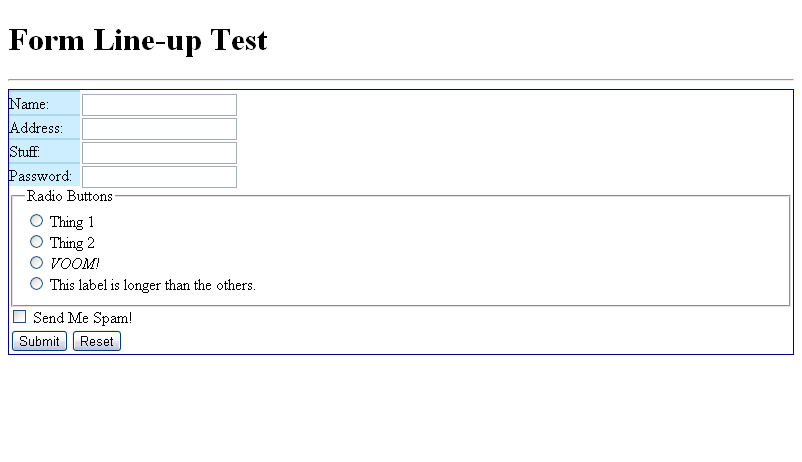
My solution was to nest the inputs I wanted to align inside a div, style the div so it would shrink to the width of its contents, and then use absolute positioning on the inputs (nested inside relative-positioned <label>s) to push them to the left by 100% of the width of the div.
Screen shot of form lineup test, working so far. Four text fields are aligned as expected. Radio and checkbox inputs outside the wrapper <div> are unaffected.
If it sounds too easy, that's because it is. Here's what doesn't work:
  1. It only works with inputs that are the same height as the labels, which means it won't work with <textarea>s, multiple-row <select>s, and probably others I'm forgetting.
  2. Checkboxes and radio buttons inside the wrapper div can't be put before their labels because the positioning automatically puts the inputs on the right.
  3. Longer labels, such as you might need to ue for checkboxes and radio buttons, will stretch the wrapper <div>'s width.
  4. Those last two aren't problematic if you can group all your text inputs together and save everything else for the end. If you want to put anything between two groups of text inputs, though, you'll need two separate wrapper <div>s, which won't line up with each other.
Screen shot of broken form lineup test. A <textarea> does is overlapped by the text field after it, checkboxes and radio buttons are in the wrong places, and the label column is stretched to fit the fieldset.


I will post the code as soon as I can get it cleaned up and looking nice. (My test code is embarrassingly messy.) I also plan to revisit this project and see what fixes I can make. The checkbox problem at number 2 shouldn't be too hard to solve. Then again, that's what I said about CSS forms in general.

Wednesday, August 24, 2011

Table-less Forms: Are They Really That Hard?

I probably don't need to explain the love-hate (and in many cases, just plain hate) relationship Web designers have with tables. If you don't believe me, a Google search turned up this lovely presentation on presentational tables that explains the issues in a much less hot-headed fashion than what I've typically seen before. What I usually read boils down to "Tables are evil, and you should never use them."

Naturally, this presents a few problems: Some things that are easy to do with tables and presentational HTML are much harder to do with CSS and purely semantic markup. For instance, the A List Apart article, Practical CSS Layout Tips, Tricks, & Techniques outlines a few of them and offers some solutions. There's just one thing that I have yet to see done to my satisfaction: Forms.

Every technique I've ever seen for table-less forms has the problem of sacrificing some of the functionality you get with a table. Sure, they can put labels and fields on the same row and even make sure the fields all line up together. However, most of them use either a fixed width or a percentage width for the label column. A table, on the other hand, will resize the columns to fit the content.

Worse still, some of the supposedly more semantic approaches introduce extra markup. The A List Apart article linked above gives us this mess:

<div style="width: 350px; background-color: #cc9;
border: 1px dotted #333; padding: 5px;
margin: 0px auto";>
  <form>
    <div class="row">
      <span class="label">Name:</span><span
class="formw"><input type="text" size="25" /></span>
    </div>
    <div class="row">
      <span class="label">Age:</span><span
class="formw"><input type="text" size="25" /></span>
    </div>
    <div class="row">
      <span class="label">Shoe size:</span><span
class="formw"><input type="text" size="25" /></span>
    </div>
    <div class="row">
      <span class="label">Comments:</span><span
class="formw">
        <textarea cols="25" rows="8">
        Go ahead - write something...
        </textarea>
      </span>
    </div>
  <div class="spacer">
  &nbsp;
  </div>
 </form>

</div>
Admittedly, that article is ten years old, which probably explains why it's a rather extreme example. But come now, <span class="label"> rather than just <label>? Inline styles? More importantly, <div class="row">? Isn't that awfully similar, structurally speaking, to a table? I thought part of the objective was to trim the fat from the code, and this doesn't have too many fewer tags than a table. To be fair, a more recent article from 2006 does a better job (though I'm not sure why the author chose an unordered list), but still doesn't solve the width problem.

Now some people will tell you that there's no problem with using tables to lay out forms. After all, they really are tabular: Labels get one column, form fields get another. The label refers to the form field on the same row. Besides, if you look at a real form, i.e. one made of ink and paper, it looks like a table. Besides, they're quick and simple to create, which is no small consideration when time is a factor.

I agree, to a point. I've certainly used tables to line up forms before, and I feel no remorse. Even so, it's not a perfect solution. For one thing, while you can make a case that forms are tabular enough to excuse the use of tables, that isn't really the most semantic way to do it. For another, you're still stuck with table markup and form markup.

What I really want is a method that will line everything up the way a table does, stretch or shrink the label column to fit the text, and minimize the extra HTML. To reiterate, I have never seen a solution that does this, though that may very well be because I haven't looked very hard. It seems like it shouldn't be too difficult to create such a solution.

So I think I will. Stay tuned.